SimPilot ACARS 2.1
Track the flight.
Track the flight.
Keep the evidence.
SimPilot ACARS connects your simulator to your active booking. It checks the aircraft, follows each phase of flight and records the data used to build your PIREP.
Windows client
Live telemetry
Operational validation
From booking to logbook
Four steps from sign-in to PIREP.
ACARS keeps the booking, simulator and aircraft details together while you fly, then sends the completed report to Crew.
Sign in
Use your SimPilot World callsign and password. Your pilot identity, rank and active booking are synchronized.
Validate
The client checks simulator connectivity, departure, aircraft ICAO and approved aircraft aliases before tracking.
Track
Start the flight and follow route progress, flight phase, checklist state, operational status and live telemetry.
Submit
After arrival, parking and shutdown, send the PIREP for review and career rewards.
In-flight dashboard
The information you need while flying.
View full size
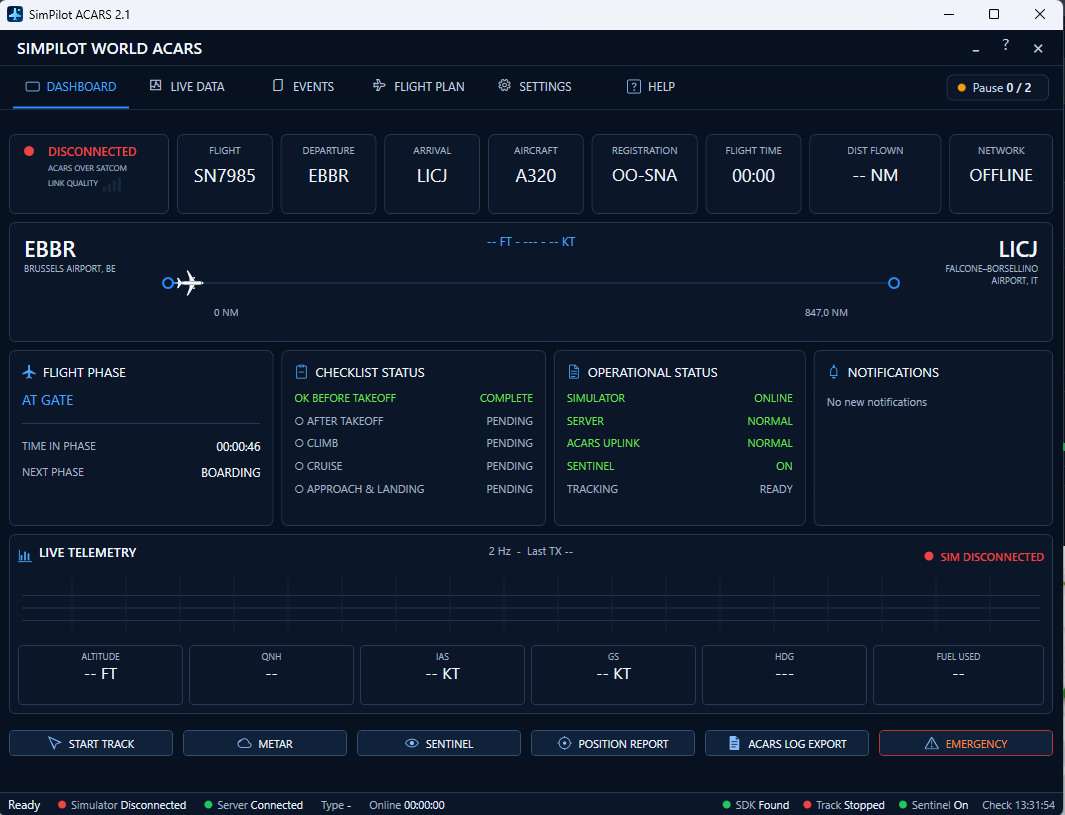
01 / Dashboard
Keep the operation in view.
The dashboard shows your booking alongside the current simulator state, without making you switch between pages.
- Flight number, departure, arrival, aircraft and registration.
- Route progress, distance flown and current network status.
- Automatic flight-phase detection and time spent in each phase.
- Before takeoff, climb, cruise, approach and landing checklist status.
- Altitude, QNH, IAS, ground speed, heading and fuel-used telemetry.
- Simulator, server, ACARS uplink, Sentinel and tracking health.
 View full size
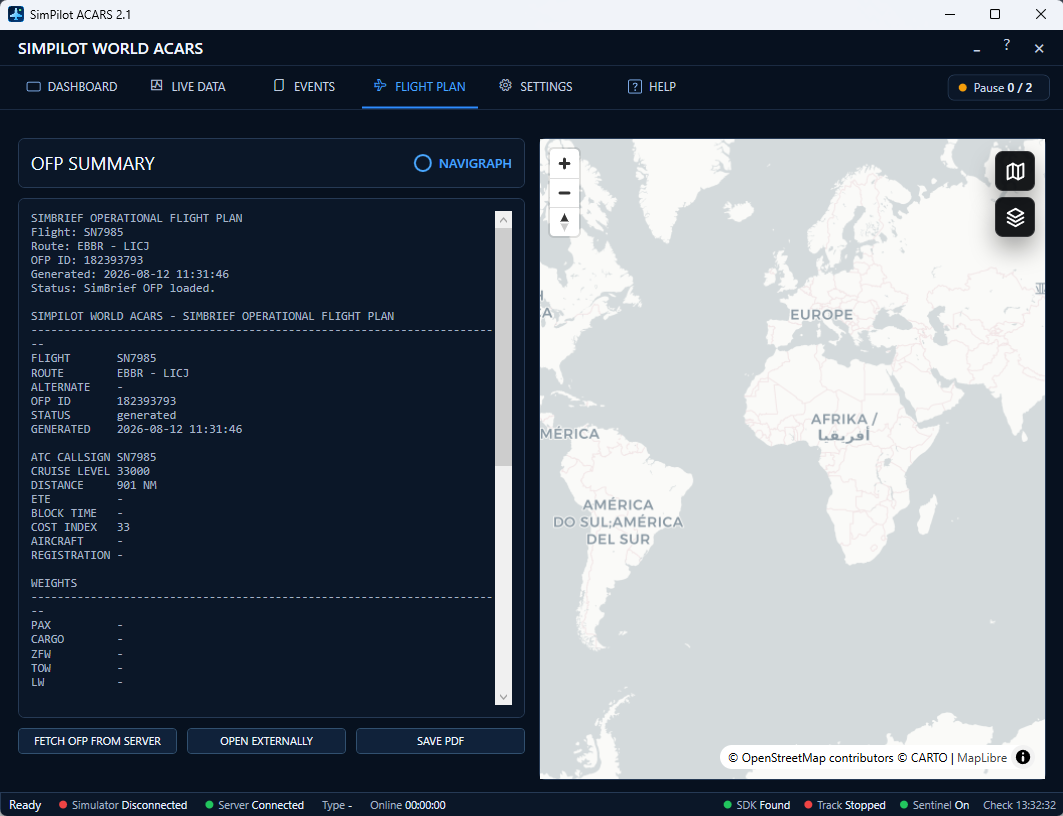
02 / Flight Plan
Keep your SimBrief OFP close.
The Flight Plan page retrieves the OFP linked to your booking, so you can refer to it without leaving ACARS.
- SimBrief OFP summary with route, cruise level, distance and weights.
- Navigraph-linked planning workflow when connected by the pilot.
- Interactive route map with zoom and selectable map layers.
- Fetch the latest OFP from the server, open it externally or save the PDF.
 View full size
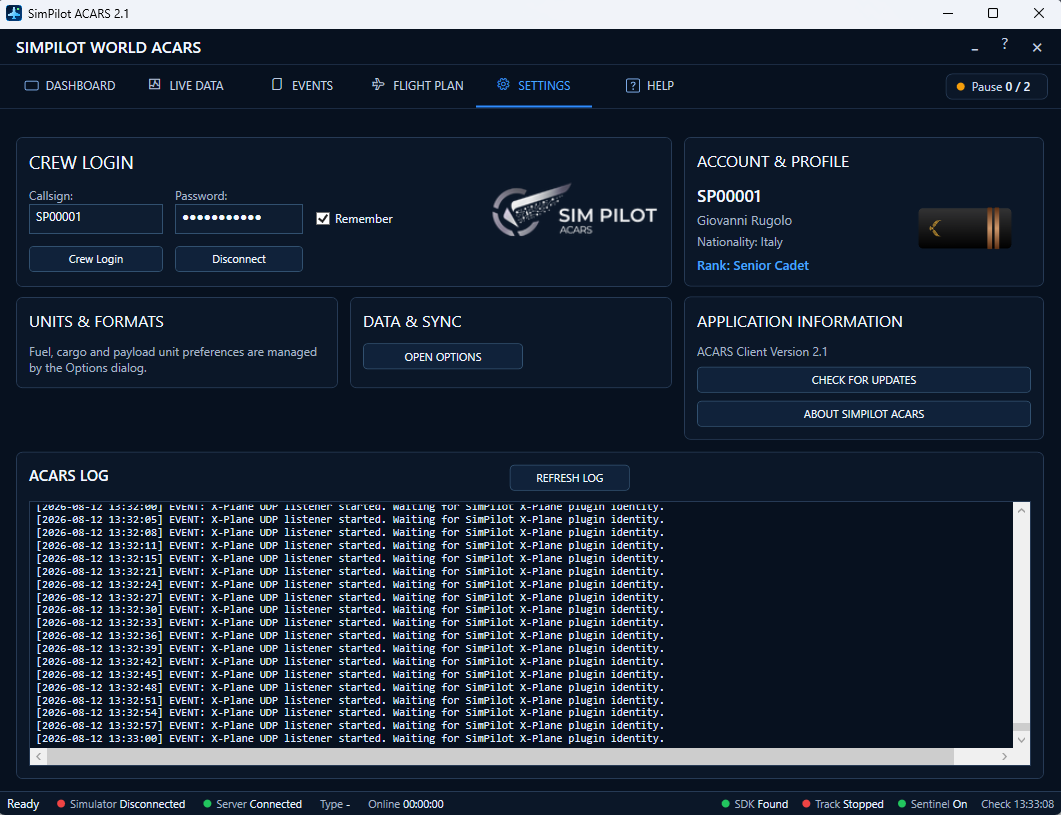
03 / Settings & Diagnostics
Check your account and connections.
Settings brings your pilot details, application status and troubleshooting information into one place.
- Crew login, pilot profile, nationality, career rank and insignia.
- Platform-managed fuel, cargo and payload units.
- Data synchronisation options and application update checks.
- Detailed ACARS log for simulator, server and plugin diagnostics.
Recorded flight data
Understand what ACARS recorded.
The PIREP analysis keeps raw telemetry, detected events and the final evaluation separate, so each part can be reviewed on its own.
Simulator detection
Connection indicators distinguish the server link from the simulator link and identify the detected simulator when available.
Events & notifications
ACARS records operational events as they happen, gives you immediate feedback and builds a timeline for the PIREP.
Sentinel monitoring
Sentinel monitors tracking continuity and operational health while the client remains connected to the simulator and server.
METAR access
Departure and arrival weather can be consulted directly during the operation to support preparation and situational awareness.
Position reports
Live position and flight-state updates keep SimPilot World traffic, progress and operational records synchronized.
Transparent PIREPs
The finished flight provides telemetry, detected events and performance evidence used for approval, scoring and career progression.
Ready for departure
Connect your next flight to your career.
Book a flight in Crew, start your simulator and sign in to ACARS. Once you submit the PIREP, the flight becomes part of your pilot record.